
All Weather Mode: Weather Home
Clarity App CraftingPersonalization
3.9233.00 Reviews
- Version
- 1.3.96
- Installs
- 500.00K
- Age Rating
- Everyone
Screenshots
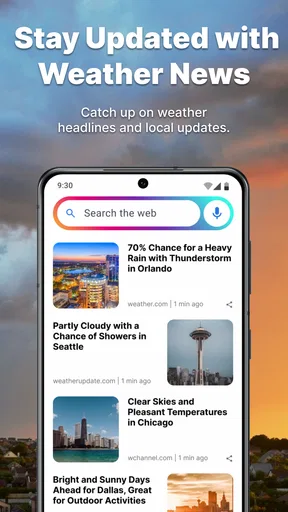
Our Review of All Weather Mode: Weather Home
 Analysis by Appyee
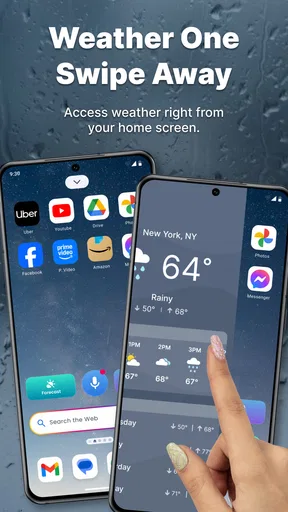
I like weather tools that stay out of the way until I need them, and All Weather Mode: Weather Home takes that idea seriously. It is a free personalization app from Clarity App Crafting that puts local conditions, hourly information, and a seven-day outlook within a swipe of the home screen. After using it, I see the appeal: it is less about becoming a complete weather station and more about making a quick forecast part of the way I use my phone.
That focus makes the app easy to understand. You are not opening a large dashboard packed with radar layers, warnings, maps, and lifestyle extras. Instead, the experience is built around seeing weather information during normal phone use. For someone who checks the forecast before leaving home, choosing clothes, walking the dog, or deciding whether to carry an umbrella, that can be more convenient than opening a separate weather app every time.
How the current experience feels in everyday use
The most useful part of the concept is the connection between the home screen and the forecast. A traditional weather app asks me to remember to open it. This one places weather closer to the starting point of my phone routine, so checking conditions feels like a glance rather than a separate task. That small difference matters when I am rushing out in the morning or checking whether an evening plan still makes sense.
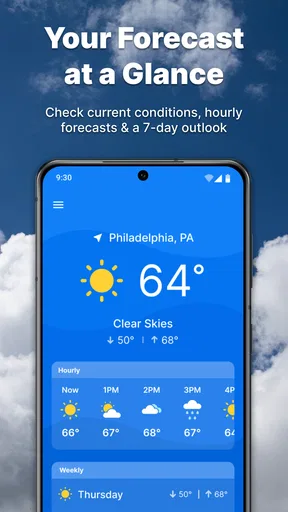
The local focus also keeps the experience practical. I am usually not looking for a broad weather report; I want to know what is happening where I am and how it may change during the day. The combination of current conditions, hourly forecasting, and a seven-day view covers the questions I ask most often: what is happening now, what will happen later, and what should I expect over the next several days?
I found the hourly view especially useful for decisions that are too short-term for a daily forecast. A seven-day outlook might tell me that rain is possible, but an hourly view helps me decide whether to go for a walk now, wait until later, or move an errand to another part of the afternoon. That is a more meaningful use of the app than simply checking a temperature number once a day.
A realistic morning routine
Imagine a weekday morning when I have to leave for work, but I also want to cycle part of the way. I can glance at the home screen, check the current conditions, and then look at the hourly trend instead of relying on a single daily icon. If the weather looks manageable now but changes later, I may choose a different route or bring another layer. The app is valuable here because it reduces the number of steps between waking up and making a decision.
The same workflow works for parents planning school runs, people who work outdoors, and anyone whose day depends on short weather windows. It is also handy for travelers who want a quick look at the coming week without navigating through a complicated interface. I would not treat a forecast as a promise, but I do appreciate having the information close enough to become part of a routine.
What the home-screen approach changes
Putting weather near the home screen changes the balance between convenience and detail. The advantage is speed. I do not need to search for the app, wait through a busy opening screen, or move through several panels before finding a basic forecast. The trade-off is that a home-focused experience may not satisfy someone who wants deep meteorological analysis every time they check the weather.
This is where the app differs from the usual alternatives. A full weather service is normally better for radar, severe-weather tracking, detailed maps, and extensive location management. A simple built-in weather widget may be faster for people who already have one configured, but it may not offer the same dedicated focus on bringing several forecast time frames together. All Weather Mode: Weather Home sits between those options: more intentional than a passive widget, but less ambitious than a complete weather command center.
Development, version context, and what has changed for users
The app was released on November 21, 2023, and its current version is 1.3.81. I see that version number as a sign that the product has moved beyond its first basic release and is being maintained as an active utility. That does not automatically prove that every part of the experience is polished, but it does make the app feel like an evolving product rather than a one-off home-screen experiment.
For existing users, the important point is continuity. The central promise remains recognizable: weather information should be available quickly, with local conditions, hourly forecasting, and a longer outlook close at hand. The current version does not appear to be a completely different kind of app from the one suggested by its original purpose. That consistency is helpful because people who build a home-screen habit do not usually want the underlying workflow redesigned without warning.
I would still separate confirmed current characteristics from expectations about future development. The version history gives me confidence that Clarity App Crafting is continuing to work on the app, but I would not assume that future updates will add radar, richer alerts, extra widgets, or advanced forecasting tools unless those changes are actually announced. For now, I judge the product by what it already does well: quick access and a compact forecast workflow.
The app has attracted over 500 thousand installs, with an average rating of 3.9 from around 635 ratings and 155 written reviews. Those figures suggest that it has found a real audience, while also showing that the experience is not universally perfect. I would read the rating as a reason to approach it with realistic expectations: useful for a focused weather habit, but not necessarily a replacement for every weather tool on a phone.
What the current version means for a new installation
If I were installing it today, I would begin by asking whether I want weather to be part of my home-screen behavior. That question matters more than whether I need another forecast source. If I already have a weather widget that I like and check regularly, the change may feel unnecessary. If I often forget to open a weather app, the home-oriented design has a clearer reason to exist.
The app is free, which lowers the cost of trying it. I can test whether the swipe-based habit fits my routine without committing money first. That is particularly useful for people who are unsure whether a personalization tool will become genuinely useful or simply add another layer to the phone. The content rating is Everyone, so it is positioned as a broadly accessible utility rather than an app aimed at a narrow age group.
It requires Android 9 or later. For users with a reasonably modern Android phone, that should make compatibility straightforward, but anyone using an older device should check the operating system before planning around it. I also would not confuse broad compatibility with identical performance on every phone; home-screen behavior can feel different depending on the launcher and the way a device handles personalization apps.
Three practical ways to get more from it
First, I would use the hourly forecast for decisions within the same day and reserve the seven-day outlook for planning rather than certainty. That sounds obvious, but it prevents a common mistake: treating a distant daily symbol as precise enough to guide a specific appointment. The longer view is best for spotting patterns and preparing, while the hourly view is better for timing.
Second, I would make the home-screen glance part of an existing habit instead of trying to remember a new one. Checking the phone before leaving the house, after waking up, or before starting a commute gives the app a natural place in the day. A weather tool becomes much more useful when it is attached to a decision I already make, not when I install it and hope I remember it later.
Third, I would compare the app’s quick view with a more detailed weather service when conditions matter. For a casual walk, the compact forecast may be enough. For a long drive, outdoor work, travel, or changing conditions, I would want to verify the situation with a service that provides the depth I need. The smart trade-off is speed for routine checks and detail for higher-consequence decisions.
Where it still falls short
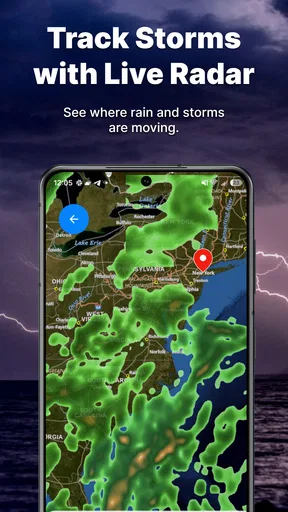
The main limitation is scope. The app’s identity is built around bringing weather closer to the home screen, not around replacing every specialized forecasting feature. If I want radar imagery, detailed warnings, historical charts, multiple weather models, or extensive location tools, I would look elsewhere. Adding too many advanced features could also weaken the clean purpose that makes this app attractive, so the missing depth is both a limitation and part of its design trade-off.
There is also a practical question about whether the home-screen layer adds enough value for each person. Some Android users already have a built-in weather widget or a launcher arrangement that makes forecasts easy to reach. In that situation, installing another personalization app may create overlap. I would skip this one if my existing setup already gives me current, hourly, and weekly information with no extra effort.
People who need highly dependable information for safety-sensitive work should be cautious about relying on any single compact forecast view. The app can support everyday planning, but I would still check official local alerts or a more specialized service when severe conditions, travel risks, or outdoor responsibilities are involved. Convenience is not the same as complete coverage.
The rating of 3.9 also reinforces my balanced view. It is not a warning to avoid the app, but it suggests that the experience may depend on personal expectations and device setup. Someone looking for a simple, accessible way to bring weather into a phone routine may be pleased. Someone expecting a feature-heavy professional forecast tool may be disappointed even if the core idea works exactly as intended.
Who should install it, and who should pass?
I would recommend it to Android users who want a fast local forecast without opening a conventional weather dashboard. It is a good match for people who check conditions several times during the day, prefer information near the home screen, or want a straightforward combination of current, hourly, and weekly views. It also makes sense for anyone who likes personalizing the way their phone surfaces useful information.
I would be less likely to recommend it to someone who mainly wants weather maps, detailed alerts, or a large collection of locations. Travelers, outdoor professionals, and weather enthusiasts may get more value from a dedicated service designed around depth rather than quick access. I would also skip it if I already have a home-screen weather setup that I trust and use comfortably.
For first-time users, my advice is to test it during a normal week rather than judging it after one glance. Notice whether the home-screen access actually changes how often you check the forecast, and whether the hourly view helps with real decisions. If it becomes part of your morning and departure routines, it is doing something useful. If you still open another weather app every time, the extra personalization layer may not be earning its place.
My final view of All Weather Mode: Weather Home
All Weather Mode: Weather Home is a focused personalization app with a clear everyday purpose. I like that it treats weather as information I should be able to reach quickly, not as a destination I must deliberately visit. The local view, hourly planning, and seven-day outlook give it enough range for ordinary routines, while the home-screen approach keeps the experience approachable.
Its weaknesses are just as clear. It is not the right tool for users who want a full weather laboratory, and it may overlap with features already included on an Android phone. The best reason to install it is not the promise of endless detail; it is the reduction of friction between picking up the phone and knowing what the day may look like.
Clarity App Crafting has brought the app to version 1.3.81, and the product’s continued presence suggests room for it to keep developing. I would watch future updates for improvements that preserve the quick home-screen workflow while making the forecast more useful for different routines. Until then, I see it as a sensible free option for people who want weather information integrated into everyday phone use, provided they understand that convenience comes before specialist depth.
My recommendation is straightforward: try it if you want a cleaner path to local weather and do not already have an equally convenient setup. Keep a more detailed weather source available for serious planning, and judge this app by whether it helps you make faster daily decisions. For that specific job, it is a practical and approachable choice.
Privacy and Permissions
See what permissions an app requests and how it handles your data.
- Location
- approximate location (network-based), precise location (GPS and network-based)
- Microphone
- record audio
- Wi-Fi connection information
- view Wi-Fi connections
- Other
- view network connections, full network access, set wallpaper, control vibration, prevent device from sleeping, set an alarm, Google Play license check
Verdict
Strengths of All Weather Mode: Weather Home
- Clean home-screen widget with weather information at a glance.
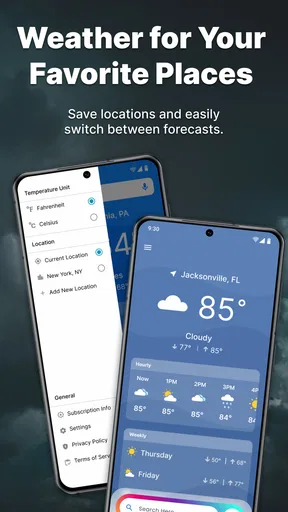
- Supports multiple locations for convenient travel planning.
- Useful forecasts help prepare for changing outdoor conditions.
- Simple layout is easy to understand for most users.
- Weather updates can reduce the need to open a full forecast app.
Limitations of All Weather Mode: Weather Home
- Accuracy may vary depending on the selected weather data provider.
- Some advanced features may require a subscription or in-app purchase.
- Frequent updates can increase battery and mobile data usage.
- Widgets may need manual refreshing after system or location changes.
- Ad-supported elements may make the experience feel less streamlined.
Similar Picks in This Category
View All
Microsoft SwiftKey AI Keyboard
SwiftKey4.3

Wallpapers
Google LLC4.1

Zedge™ Wallpapers & Ringtones
Zedge4.7

Yandex Browser with Alice AI
Direct Cursus Computer Systems Trading LLC4.3

Ringtone Maker:create ringtone
Big Bang Inc.4.7

Fonts Keyboard
Fonts Keyboard3.9
Frequently Asked Questions
What is All Weather Mode: Weather Home?
All Weather Mode: Weather Home is a weather-focused home screen application designed to make current conditions and forecasts easier to see at a glance. It may combine weather information with customizable home-screen elements, such as backgrounds, widgets, or visual effects that reflect the current weather. The exact features can vary depending on your device, Android or iOS version, location, and the permissions granted during setup.
Does All Weather Mode: Weather Home provide accurate weather forecasts?
The app’s forecast quality depends largely on the weather data provider it uses, your selected location, and the availability of local meteorological information. In testing, users should compare important warnings with an official national weather service, particularly during storms or extreme conditions. Forecasts are estimates and can change frequently, so the application should be treated as a convenient daily reference rather than the only source for safety-related decisions.
What permissions does All Weather Mode: Weather Home require?
All Weather Mode: Weather Home may request location access so it can show weather conditions for your current area, while notification permission may be used for forecast updates or alerts. If it functions as a home-screen replacement or provides widgets, it can also require additional setup permissions. Review each request carefully, choose approximate or one-time location access when available, and disable permissions that are not necessary for the features you intend to use.
Can I customize the home screen and weather display?
Customization options depend on the version of All Weather Mode: Weather Home installed and the capabilities supported by your device. Users may be able to select a location, change visual themes, adjust units such as Celsius or Fahrenheit, and configure widgets or weather-related backgrounds. Some designs or advanced options may be restricted to a premium plan, so check the in-app descriptions before subscribing or assuming every feature is included for free.
Is All Weather Mode: Weather Home free to download and use?
The application may be available as a free download while offering advertising, optional purchases, subscriptions, or premium customization tools. Before completing installation, check the Google Play Store or Apple App Store listing for the current pricing, trial conditions, renewal terms, and supported devices. If you start a free trial, remember that it can automatically renew unless canceled through your store account before the stated billing date.
